Step inside your running Odoo.
Visudoo (Visual Odoo) turns any installed Odoo module into a living, interactive 3D spatial environment. From CRM sales offices and inventory warehouses to manufacturing shop floors and project studios — explore real-time operations without installing a single Odoo addon.
- Any Module
- Universal
- Odoo Addons
- 0
- Live JSON-RPC
- 100%
Shown above: the CRM diorama. Desks represent pipeline stages, avatars are active salespeople, and every metric synchronizes live over JSON-RPC.
Universal Odoo Gateway: Reads stock ORM models via JSON-RPC
Zero-Intrusion: No server changes, custom modules, or schema migrations
Modular Architecture: Pluggable 3D environments for any installed app
Visual Odoo: Transforming abstract tables into spatial realities.
Traditional ERP interfaces are trapped in dense grids, nested relational forms, and endless list views. Visudoo bridges the gap between raw database records and human spatial intuition.
By interpreting installed Odoo business objects into specialized 3D spaces, executive leaders, team managers, and floor operators can navigate their company's pulse like a living, breathing diorama.
Spatial Intuition
Understand scale, bottlenecks, and activity at a single glance without deciphering query tables.
Non-Invasive
Connects strictly as an external visual client. Your Odoo stability and upgrades remain 100% untouched.
Multi-Module Ready
Designed to dynamically discover and attach 3D visualizers to whatever Odoo modules you run.
Real-Time Sync
Queries run against your live database, rendering exact amounts, active users, and stage metrics.
One platform, every Odoo workflow
Visudoo's modular registry architecture maps standard Odoo models (crm.lead, stock.picking, mrp.production, etc.) to tailored 3D worlds.
CRM Pipeline Office
crm.stage · crm.lead · res.users
Pipeline stages become physical desks, deals form interactive piles, and avatars for salespeople travel between stages as opportunities progress.
- Stage revenue totals & deal sizing
- Activity status badges (overdue, today, planned)
Inventory & Warehouse
stock.location · stock.picking · stock.quant
Isometric warehouse dioramas displaying bin locations, 3D rack utilization, incoming/outgoing transfer queues, and low-stock alert heatmaps.
- Visual stock density & bin occupancy
- Live delivery & receipt workflow paths
Manufacturing & MRP
mrp.production · mrp.workorder · mrp.workcenter
Watch production lines and work centers in motion. Track work orders, machine bottlenecks, BOM assembly progress, and maintenance alerts.
- Work center throughput & load gauges
- Real-time assembly stage animations
Project & Tasks Studio
project.project · project.task · timesheet
3D project boards where sprint towers, milestone flagposts, and task blocks represent workload distribution, burn-down, and blocker dependencies.
- Interactive task towers & assignees
- Milestone velocity & deadline radar
Point of Sale & Retail
pos.session · pos.order · pos.config
A retail store view with interactive checkout counters, live session transaction streams, peak hour velocity graphs, and cashier shift statuses.
- Open counter status & daily totals
- Live order ticket ticker & payment splits
HR, Team & Fleet Floor
hr.employee · hr.attendance · fleet.vehicle
Floorplan visualizations of team attendance, active check-ins, department seating, leave schedules, and vehicle fleet dispatch status.
- Present vs remote attendance overview
- Department cluster dynamics & fleet map
Unified ERP Data in Spatial Sync
From customer inquiries in CRM to raw material allocation in Warehouse and final production scheduling on the Factory Floor, Visudoo visually animates the operational flow across all your departments.
Sales orders trigger inventory reservations; low stock prompts manufacturing work orders.
Visudoo queries your Odoo backend using native RPC protocols without intermediate middleware.
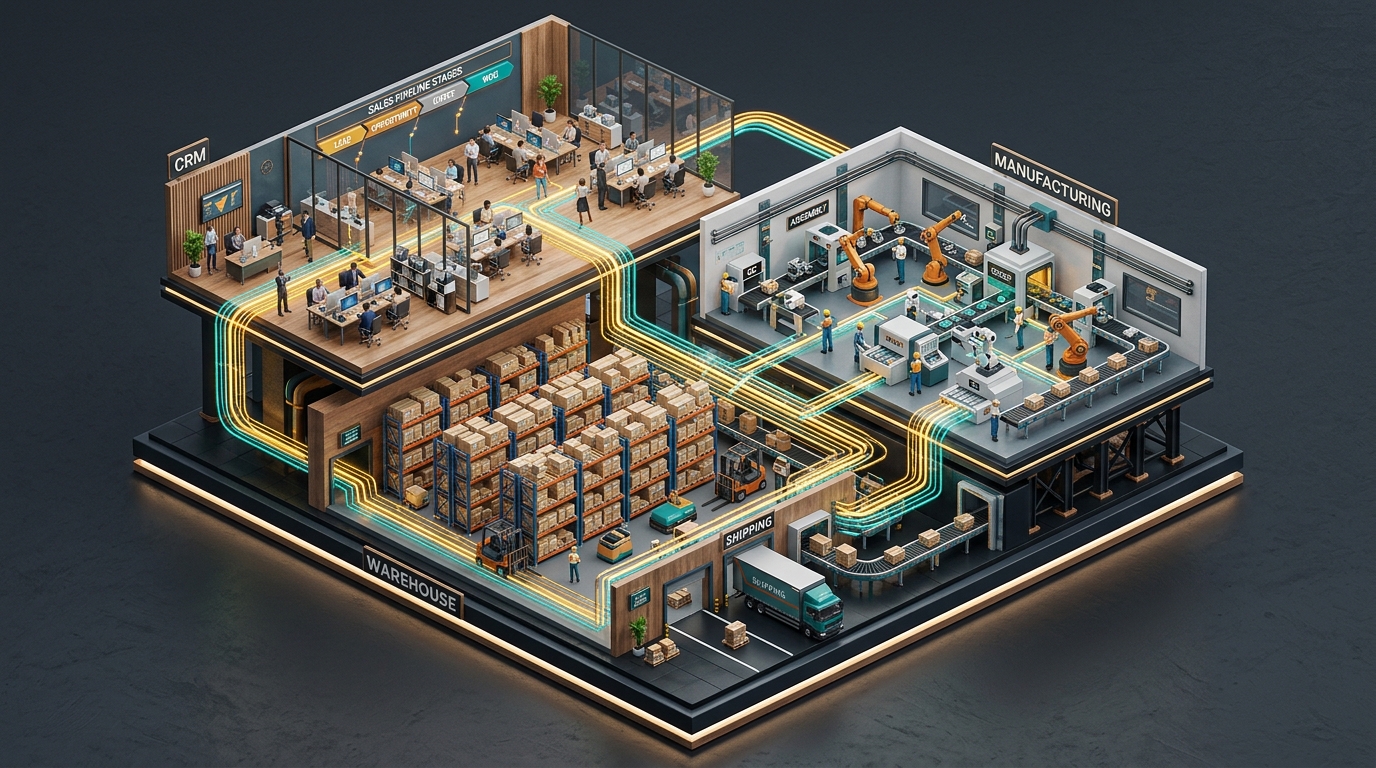
Every object tells a real business story
In Visudoo, 3D geometry is directly bound to live database records. Nothing is superficial decoration.
-
Physicalized Work Stages
Whether it's CRM pipeline stages, warehouse picking zones, or manufacturing lines — each station dynamically scales with item counts, volume, and value.
-
Living Avatars & Roles
Sales reps, warehouse operators, and project assignees walk the 3D aisles and station themselves where work is active. Ownership is instantly visual.
-
Real-time Alert Badges
Next actions, low-stock warnings, scheduled maintenance, and SLA deadlines float above objects with color-coded urgencies (overdue, today, planned).
-
True Company Context
Figures inherit your company's native currency symbols, formatting rules, user permissions, and multi-company boundaries seamlessly.
Connect to any running Odoo in seconds
No custom Python code, no app store purchases, and zero downtime for your team.
-
STEP 1
Generate an Odoo API key
Inside Odoo: User menu → Preferences → Account Security → API Keys → New. Visudoo uses standard Odoo user credentials.
-
STEP 2
Connect Visudoo
Click the connection pill in Visudoo, input database name, user login, and your API key. The status turns green instantly.
-
STEP 3
Explore 3D Worlds
Orbit with drag, zoom with scroll, click stations to inspect live records. Switch between installed modules via the top navigation.
Prefer local or staging containers? Run Odoo, Postgres and Visudoo with one command:
docker compose up --build
Open
localhost:3303
100% faithful to your Odoo logic
Visudoo executes standard Odoo ORM domain filters over standard JSON-RPC endpoints (/jsonrpc). All calculations, security groups, and
active states respect native Odoo rules.
- Context-aware scopes. CRM views reflect user assignments, inventory reflects selected warehouses, and projects respect active team memberships.
- Active record filtering. Archived, cancelled, or lost records never distort your live operational metrics.
- Multi-currency & companies. Formatting,
currencies, and decimal precision pull straight from
res.companyandres.currency.
| Stage / Station | Live Items | Value / Load |
|---|---|---|
| New Inquiries | 2 | 80K |
| Qualified Leads | 3 | 51.3K |
| Proposition / Review | 4 | 79.1K |
| Won / Completed | 1 | 19,800 |
Questions, answered
What is Visudoo and where does the name come from?
Visudoo stands for Visual Odoo. It is a spatial 3D visualization platform designed to bring any installed Odoo ERP module (CRM, Inventory, Manufacturing, Projects, POS, HR, and more) into an intuitive, game-like visual realm.
Is Visudoo limited to just the CRM module?
No! While the CRM Office diorama is the premier showcase module, Visudoo is built with a modular registry designed to visualize any installed module on your running Odoo instance (including Inventory/Warehouse, Manufacturing/MRP, Projects/Tasks, HR/Attendance, and Point of Sale).
Do I need to install any custom addons or Python modules inside Odoo?
Zero. Visudoo communicates with stock Odoo 18 (as well as 17, 16, and 15) using the native JSON-RPC API and standard user API keys. No backend code modifications, no server restarts, and no risk to your existing Odoo codebase.
How are user permissions and data access handled?
Because Visudoo connects using your Odoo user account's API key, it inherits all Odoo access control lists (ACLs), record rules, and company domain constraints automatically. Users only see data they are permitted to view in Odoo.
What happens if Odoo is offline or unreachable?
Visudoo includes built-in offline demo datasets and clearly indicates connection status with a top-bar pill. It never displays silent blank screens or falsely presents demo figures as live data.
How do I deploy and run Visudoo?
You can run Visudoo locally via Node/Vite (npm run dev) or
with Docker Compose (docker compose up --build).
The included Nginx reverse proxy handles all API proxying with zero CORS configuration required.
Bring your entire Odoo ERP to life.
Connect your running Odoo database and explore your business through interactive 3D spatial worlds today.